Why Is My Email Late?
Paste raw email headers below, then click Analyze Headers to trace every server hop, calculate transit delays hop-by-hop, and pinpoint exactly where time was lost — alongside a plain narrative of the delay, useful for anyone from IT administrators to business users trying to understand why an important email never arrived.
How to Use This Tool
Email headers are the hidden audit trail every message carries — a timestamped log of every server that touched your email before it reached the inbox. When a message arrives hours late, gets flagged as spam, or disappears entirely, those headers contain the answer.
To get started, open the original message in your email client. In Gmail, click the three-dot menu and choose Show original. In Outlook, open the message properties dialog. In Apple Mail, use View → Message → All Headers. Copy the entire raw header block — everything from Return-Path: down to the first blank line — and paste it into the box below.
This tool runs entirely in your browser. No header text leaves your device. Sensitive addresses are masked by default before any copy or export action.
Get a Shareable Executive Report
After analyzing your headers, download a plain-English summary your manager, legal team, or vendor can read immediately — no IT background needed. Unlike any other email header tool.
How to copy raw email headers
Understanding Email Headers and Delivery Delays
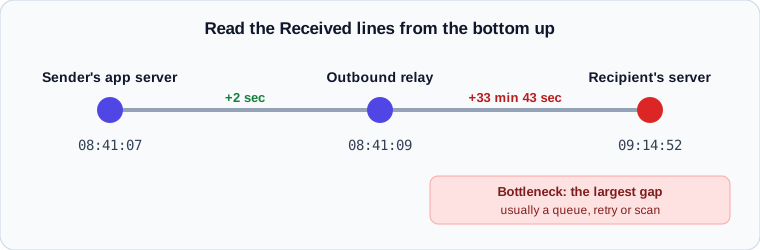
Every email you send travels through a chain of mail servers before reaching its destination. Each server in that chain — called a Mail Transfer Agent, or MTA — appends a Received: header recording when it accepted and forwarded the message. By reading these headers in sequence, it is possible to calculate exactly how long each server took to process and hand off the email, and to pinpoint the precise step where significant time was lost.
Email delays are more common than most people realize, and they rarely mean the message is lost. The most frequent causes include greylisting (a spam-prevention technique where the receiving server temporarily rejects the first delivery attempt, causing a 5–15 minute retry gap), outbound queue backlogs (the sending server was under load and held the message before dispatching it), and corporate gateway policy holds (compliance systems that inspect content before allowing it to leave the organization). Less common causes include DNS lookup failures, TLS negotiation issues, and recipient-side rate limiting by large providers such as Gmail or Outlook.
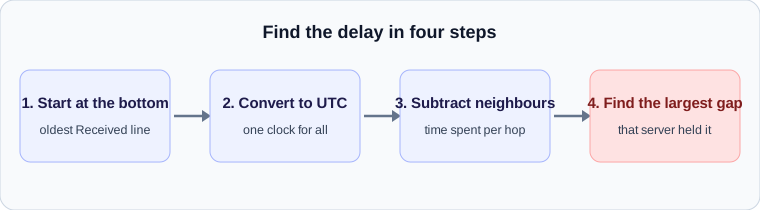
WhyIsMyEmailLate parses the raw header block, normalizes every timestamp to UTC to eliminate timezone inconsistencies, and calculates the inter-hop latency at each step. The result is a hop-by-hop timeline that visually identifies the bottleneck — the single server responsible for the largest portion of the delay. A plain-language Transit Narrative then translates the technical findings into a clear explanation suitable for anyone from IT administrators to business professionals trying to understand why an important message arrived late.
All processing runs entirely in your browser. No headers, email addresses, or IP addresses are transmitted to any external server. The optional PII masking feature further redacts personal identifiers from the displayed output, making it safe to share analysis results with colleagues or IT teams without exposing sensitive routing data.
From the Learning Center
Guides on reading headers, authentication results, SMTP error codes and the real causes of delay.
- What Are Email Headers? How to Read Them
- How SMTP Routing Works, Hop by Hop
- Common Causes of Email Delays and How to Spot Them
- How to Find the Delay in an Email Header
- SPF, DKIM and DMARC Results in Email Headers
- Gmail, Yahoo and Outlook Sender Rules Explained
- SMTP Error Codes: What 4xx and 5xx Replies Mean
- How Security Scanning Delays Email
- Why Forwarded Email Fails Authentication
- Greylisting Explained: Why Your Email Arrives Late
- MX Records and DNS: How Mail Finds Its Destination
- TLS, STARTTLS and MTA-STS in Email Delivery
- How to Read an Email Bounce Message
- Reading Microsoft 365 Email Headers
- Date vs Received: Why Email Times Disagree
- Reverse DNS, PTR and HELO for Mail Servers
- How to Roll Out DMARC Without Losing Mail