SPF, DKIM and DMARC Results in Email Headers
What spf=pass, dkim=fail and dmarc=none actually mean, where they appear in a header, and which of them you can trust.
Last reviewed October 26, 2026 · 9 min read
Somewhere near the top of nearly every modern email header is a line starting with Authentication-Results. It is short, dense, and easy to skip. It is also the clearest record of whether the receiving server believed the message came from who it claimed to come from.
This matters for delays for a practical reason. A message that fails authentication does not always bounce. It may be deferred, held for extra checks, or quietly delivered to the junk folder, and from the recipient’s side all three look like a missing or late email.
Where the results live and who wrote them
The Authentication-Results header is defined in RFC 8601. It is added by the receiving mail server after it has run its checks, and it begins with an identifier for the server that did the checking, followed by one result per method. A typical line looks like this:
Authentication-Results: mx.example.org;
   spf=pass smtp.mailfrom=news@example.net;
   dkim=pass header.d=example.net header.s=selector1;
   dmarc=pass header.from=example.net
The one rule about trusting it
The standard is explicit that the presence of this header does not prove its contents are valid. Anyone can write a line that says spf=pass. The header only means something if it was added by a server you trust, which in practice means your own mail provider, and if it is the topmost one. A sender can place a fake Authentication-Results line deeper in the header, and a careless reader will take it at face value. Read the one added by the receiving side, ignore the rest.
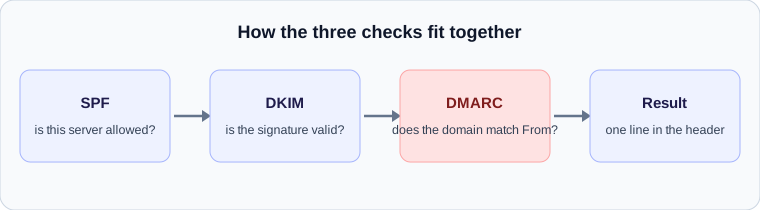
SPF: is this server allowed to send for that domain?
SPF, described in RFC 7208, lets a domain publish a list of the servers permitted to send mail using its name in the envelope sender, the address used during the SMTP conversation rather than the From line you see in your client. The receiver compares the connecting server’s IP address with that list.
The result values defined for SPF are none, pass, fail, softfail, neutral, temperror and permerror. A pass means the IP was on the list. A fail means it was explicitly not. A softfail is the domain owner saying the server is probably not authorised but they would prefer the receiver not to reject outright, and it is what you see when the policy ends in ~all. The two error values are worth noticing: temperror means the check could not finish, often because of a DNS problem, while permerror means the published record is broken, for example because it contains too many lookups.
DKIM: was the message altered, and who signed it?
DKIM, defined in RFC 6376, adds a cryptographic signature in a DKIM-Signature header. The signing domain appears as d= and the selector, which tells the receiver which public key to look up in DNS, appears as s=. In the result line these show up as header.d and header.s.
A dkim=pass tells you two things: the signature matches the key published by that domain, and the signed parts of the message were not changed after signing. A dkim=fail often means something modified the message in transit. Mailing list software that adds a footer, or a security gateway that rewrites links, are the classic causes. That is not always an attack, and it is why forwarded mail so often fails DKIM when it passed at the original destination.
DMARC: do the results line up with the visible sender?
SPF and DKIM on their own have a gap. A criminal can pass both using their own domain while displaying your domain in the From line. DMARC, from RFC 7489, closes it with a rule called alignment: at least one of SPF or DKIM must pass, and the domain it passed for must match the domain in the visible From address.
The domain owner also publishes a policy that tells receivers what to do when alignment fails. The policy value p=none means monitor only, p=quarantine asks the receiver to treat the message as suspicious, and p=reject asks the receiver to refuse it. When you see dmarc=fail on a message from a domain with p=reject, there is a good chance the message was refused or hidden, not delayed.
How a failed check shows up as a delay
Authentication failures usually cost delivery, not time. The exception is when the check itself cannot complete. SPF and DKIM both depend on DNS lookups. If the DNS server for the sending domain is slow or unreachable, the receiver may record a temperror and some systems respond by deferring the message and asking the sender to try again later. The result is a delay of the retry interval, often several minutes, with a perfectly legitimate message.
A second route is indirect. Receivers that are uncertain about a message may route it through additional scanning before delivery, and scanning adds time. If the header shows authentication results that are neither clean passes nor outright failures, such as neutral, none or softfail, it is worth looking for a gap in the Received lines at the server that recorded them.
A quick way to read the line
When you open a header, work through it in this order:
- Find the topmost Authentication-Results line and check that it names your own provider.
- Read the three results. All three pass: authentication is not your problem.
- If dmarc fails, check whether spf or dkim passed and for which domain. A pass for a different domain than the From address is a misalignment.
- If anything shows temperror, suspect DNS and look for a gap in the Received lines.
- If nothing is present at all, the receiving server may not add the header, which is common with older or custom systems.
A worked example
Suppose a header contains: spf=pass smtp.mailfrom=bounces.example.net; dkim=pass header.d=example.com; dmarc=pass header.from=example.com. That is the healthy case. SPF passed for the bounce domain, DKIM passed for example.com, and DMARC passed because the DKIM domain matches the visible From domain.
Now change one detail: spf=pass for bounces.example.net but dkim=none and dmarc=fail. SPF passed, but for a domain that does not match the From address, and no DKIM signature was present to rescue the message. Receivers following the sender’s policy may quarantine or reject it. This is the classic case of a third-party service sending on someone’s behalf without being set up to sign with their domain.
What to check first when a message looks suspicious
A short order of operations saves time.
- Find the Authentication-Results line added by your own provider, not one that arrived from further down the chain.
- Compare the domain after header.from with the domains inside the SPF and DKIM results. A mismatch is the alignment failure DMARC reports.
- Treat none differently from fail. None means a check could not run or the domain published no record, which is a configuration gap, not an attack.
- Look at the timing. A message that failed authentication and was also held for scanning shows the failure first, then a gap.
Check your own email
Paste a raw header into the free analyzer to see every hop, the time spent at each one and the largest gap. It runs in your browser and nothing is uploaded.
Open the email header analyzer