How to Read an Email Bounce Message
A bounce is a structured report in disguise. Know which part to read and the real reason for a failure is usually in the third line.
Last reviewed October 26, 2026 · 7 min read
Bounce messages have a reputation for being unreadable. Most of that comes from the top of the message, which is written for people and tends to be vague: “Delivery has failed to these recipients,” followed by a reassuring paragraph about trying again.
The useful part is lower down, in a machine-readable block that follows a fixed format. Once you know where it is, a bounce tells you which server rejected the message, in what words and whether it will keep trying.
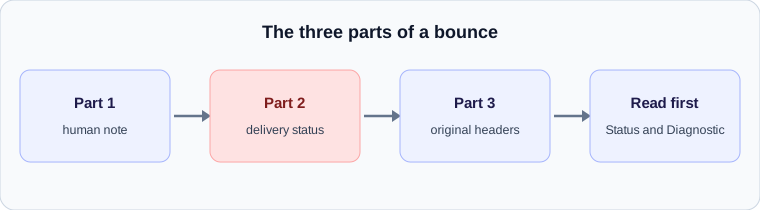
The anatomy of a bounce
Delivery status notifications are defined in RFC 3464. A bounce is a multipart message of the type multipart/report. It has up to three parts. The first is a human-readable explanation, which is the text you see in your client. The second is the machine-readable delivery-status block, which is the part worth reading. The third is optional and contains the original message or just its headers.
The bounce is sent to the original envelope return address, and it is sent with an empty return path so that two servers cannot bounce messages back and forth for ever.
The fields that matter
The delivery-status block starts with fields about the message as a whole and follows with one group per recipient. These are the ones to look for.
- Reporting-MTA: the server that generated the report. It tells you whose system sent the bounce, which is not always the server that failed.
- Final-Recipient: the address as the reporting server accepted it. If a forwarding rule rewrote the address, this is where you see it.
- Action: failed means delivery was abandoned. Delayed means the server is still trying and more notices may follow. Delivered, relayed and expanded describe successful or handed-on outcomes.
- Status: a three-part code such as 5.1.1 or 4.4.7. The first number is 2 for success, 4 for a persistent temporary failure and 5 for a permanent failure.
- Diagnostic-Code: the actual reply from the remote server, preserved word for word, such as “smtp; 550 user unknown.”
- Remote-MTA: the server that reported the status. If this is present, the diagnostic code came from that remote server. If it is absent, it came from the reporting server.
Delay notices and the retry date
A notice with Action: delayed is a warning, not a failure. The sending server is telling you it has not given up. It may include a Will-Retry-Until field, which gives the date after which the server expects to stop trying. That field is only permitted in delayed notices, so its presence tells you at once that this is an interim report and that the message may still arrive.
If you receive a delay notice, read the diagnostic code. It tells you what the last attempt hit. A 4xx code such as a mailbox-full or rate-limit reply means waiting is reasonable. A timeout or connection error points to the destination being unreachable.
Who actually rejected the message
The most common mistake with a bounce is blaming the wrong server. Compare the Reporting-MTA and the Remote-MTA. If they are the same, your own provider rejected the message before it left, for reasons such as an invalid address or a policy limit. If the Remote-MTA is a different server, the recipient’s system rejected it and your provider relayed the news.
That distinction decides who you contact. A rejection from your own provider is yours to fix. A rejection from the recipient’s server is a conversation with their administrator, and the diagnostic code is what you show them.
Common patterns
A few combinations come up repeatedly.
- 5.1.1 with “user unknown”: the address does not exist. Check for typos before anything else.
- 5.7.x codes: a policy or security refusal, often an authentication failure or a blocked sender. See our guide to SPF, DKIM and DMARC.
- 4.2.x codes: a temporary mailbox problem, such as a full mailbox.
- A bounce that arrives hours after sending, with Action: failed and no earlier delay notice: the server tried repeatedly and gave up at the end of its retry period.
Using a bounce alongside the original header
If the bounce includes the original message or its headers, you can analyse them like any other header and see how far the message got before it was refused. The hop where the trail ends is the server that rejected it. If the bounce lacks the original headers, the Diagnostic-Code is usually enough to point you to the cause.
A worked example
Imagine a bounce whose machine-readable block contains: Reporting-MTA: dns; mail.yourprovider.example, Final-Recipient: rfc822; sam@partner.example, Action: failed, Status: 5.7.1, Remote-MTA: dns; mx.partner.example and Diagnostic-Code: smtp; 550 5.7.1 message rejected by policy.
Read it in order. Your provider generated the report. The recipient is sam@partner.example. The message failed permanently. A remote server, mx.partner.example, said no, and the reason is a policy refusal. The next step is to contact the administrator at partner.example with the diagnostic text, and to check that your own authentication is correct.
When not to trust the top of a bounce
The human-readable note at the top is written by whichever system generated the bounce, and it is often generic. It may say the message could not be delivered without giving a reason. The detail is always in the delivery-status block or the diagnostic code. If your client hides those parts, view the original message source.
One more caution: bounces to forged addresses, sometimes called backscatter, can arrive for messages you never sent. If the original headers in a bounce show a message you do not recognise, ignore it. It is a side effect of someone else’s abuse, not a problem with your account.
What to do next
When a message bounces permanently, the useful work is to separate problems you can fix from problems you cannot. A mistyped address, a full mailbox that the owner can clear, or an authentication failure on your own domain are all fixable. A policy refusal by the recipient’s organisation is not, and the right response is to contact them with the diagnostic code rather than to resend the message repeatedly.
Repeated resending can make matters worse, because some receivers count repeated rejected attempts against a sender’s reputation. If a bounce is unclear, wait, change one thing, and send a single test message to see whether the result changes.
Check your own email
Paste a raw header into the free analyzer to see every hop, the time spent at each one and the largest gap. It runs in your browser and nothing is uploaded.
Open the email header analyzer