How to Roll Out DMARC Without Losing Mail
Start by watching, fix what the reports show, then tighten. A DMARC policy applied too early can block your own invoices.
Last reviewed October 26, 2026 · 8 min read
DMARC is the policy that ties SPF and DKIM to the address people actually see. Done well, it stops anyone else from sending convincing mail in your name. Done carelessly, it can cause your own legitimate mail to be quarantined or rejected.
The safe approach is gradual, and the first step takes about five minutes. Since Google and Microsoft now expect a DMARC record from larger senders, it is also no longer optional for anyone who sends at volume.
What a DMARC record says
DMARC, defined in RFC 7489, is a DNS TXT record published at _dmarc under your domain. It tells receivers two things: how to treat a message that fails the DMARC check, and where to send reports about what they saw. A minimal record looks like this:
v=DMARC1; p=none; rua=mailto:dmarc-reports@example.com
The three policies
The p tag is the policy. With p=none the receiver takes no action on failing mail, and simply reports. With p=quarantine it is asked to treat failing mail as suspicious, which in practice often means the junk folder. With p=reject it is asked to refuse failing mail at the SMTP stage.
A message passes DMARC when SPF or DKIM passes and the domain that passed aligns with the domain in the visible From address. That alignment requirement is the point, and it is why a message can pass SPF for a service’s own domain yet fail DMARC for yours.
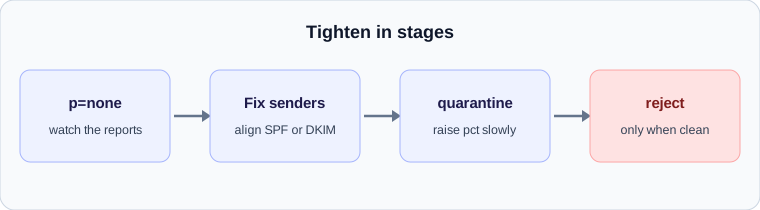
Stage 1: monitor with p=none
Publish the record with p=none and a reporting address in the rua tag. Both Google’s bulk sender rules and Microsoft’s requirements for high-volume senders accept p=none as the minimum, so this step alone satisfies them. Nothing you send is blocked.
Receivers will begin sending aggregate reports, usually as daily compressed XML files, listing which servers sent mail claiming to be from your domain and whether it passed. Reading raw XML is tedious, and many free tools turn the reports into a table. Plan to collect at least two to four weeks of data, which is enough to include monthly senders such as invoicing runs.
Stage 2: fix the legitimate sources
The reports will show senders you forgot about: the marketing platform, the support desk, the billing system, the calendar invitations and perhaps a forgotten server. For each one that is legitimate and failing, make it pass with alignment. Either add it to your SPF record or configure it to sign with DKIM using your own domain, and preferably both.
Anything that fails and that you do not recognise is either an old service or someone impersonating you. That second group is exactly what DMARC enforcement exists to stop.
Stage 3: tighten gradually
When the reports show your legitimate mail passing consistently, move to p=quarantine. The standard includes a pct tag that applies the policy to only a percentage of failing mail, so you can start with 10 percent and raise it as you gain confidence. After a few weeks of quiet reports at quarantine, move to p=reject.
Not everyone needs to reach reject. A domain that sends mail through many third-party systems it cannot fully control may reasonably stop at quarantine. But a domain that is used mainly for a few known services and is impersonated often gains a lot from it.
Why this affects delays
The link to late email is indirect but real. Mail that fails authentication is more likely to be held for extra scanning or deferred by a cautious receiver, and enforcement at big providers is tightening. A properly aligned domain gets less scrutiny, and the messages go through faster. Our guide to reading Authentication-Results shows how to confirm the result on a real message.
A summary
- Publish p=none with a reporting address today.
- Collect reports for several weeks and list every sender.
- Align each legitimate sender with SPF, DKIM or both.
- Move to quarantine with a low pct, then raise it.
- Move to reject only when reports show nothing legitimate failing.
A worked example
Say a small company sends its own mail through one provider, invoices through a billing service and newsletters through a marketing platform. The first reports show the main provider passing, the billing service failing alignment and the marketing platform passing only SPF for its own domain.
The fix is to configure the billing service and the marketing platform to sign with the company’s own domain. Two weeks later the reports show everything aligned. The company moves to quarantine for a small share of mail, then raises it, then moves to reject. At no point did legitimate mail stop, because each step followed evidence.
Mistakes that cost people mail
The same few errors turn up again and again.
- Publishing p=reject on day one, before any reports exist.
- Forgetting low-volume senders such as a payroll system or a calendar tool, which only appear in the reports once a month.
- Pointing the reporting address at a mailbox no one reads, or one that fills up.
- Changing providers without updating SPF and DKIM for the new one.
- Assuming a subdomain inherits every setting. Check how the policy applies to the subdomains you actually use.
Reading an aggregate report
An aggregate report lists each sending IP address, how many messages it sent, and whether SPF and DKIM passed and aligned. The pattern to look for is a recognisable source that passes, a recognisable source that fails, and an unrecognisable source that fails. The first needs nothing, the second needs configuration, and the third is what enforcement is meant to block.
Reports arrive from many receivers on a daily cycle, so a single day can look incomplete. Judge the data over a few weeks, and treat any source that appears only occasionally with suspicion until you have identified it. A sender you cannot name after a month is worth investigating before you move to a stricter policy.
How long each stage should last
There is no fixed schedule, but a sensible rhythm is a month of monitoring, a few weeks at a low quarantine percentage, a few more at full quarantine, and then reject. The pace depends on how many third-party senders you use and how quickly you can bring each one into alignment.
Slow is not a failure. A domain that stays at quarantine for months and has no impersonation problem has done its job. What matters is that every change follows evidence from reports and that someone is reading them.
Check your own email
Paste a raw header into the free analyzer to see every hop, the time spent at each one and the largest gap. It runs in your browser and nothing is uploaded.
Open the email header analyzer