Reverse DNS, PTR and HELO for Mail Servers
Receiving servers check whether a sender looks like a proper mail server. Mismatched names are one of the oldest reasons mail is deferred or refused.
Last reviewed October 26, 2026 · 6 min read
When a mail server connects to another, it announces itself with a name. The receiver can check that name against what DNS says about the connecting address. When they agree, nothing happens. When they do not, the receiver has an inexpensive reason to distrust the connection.
The checks are old and simple. They matter because large providers now enforce them, and because a failure often shows up as a delay or a bounce rather than a clear error.
Three names that should agree
A well-set-up mail server presents three pieces of identity, and they are expected to line up.
- The HELO or EHLO name: the hostname the sending server gives at the start of the SMTP conversation. The SMTP standard expects this to be the server’s fully qualified domain name.
- The forward DNS record: an A or AAAA record that maps that hostname to the server’s IP address.
- The reverse DNS record: a PTR record that maps the IP address back to a hostname.
Forward-confirmed reverse DNS
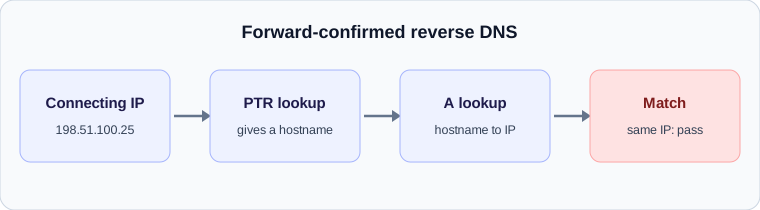
The strongest version of the check is called forward-confirmed reverse DNS. The receiver takes the connecting IP, looks up its PTR record to get a name, then looks up that name and confirms it resolves back to the same IP. A match shows that whoever controls the IP address also controls the name.
Google lists valid forward and reverse DNS records for the sending server among its requirements for every sender to Gmail accounts, effective since February 2024. This is not a bulk-sender-only rule. A small server with no PTR record is in scope.
Where the problems come from
Most failures trace back to a handful of causes, and almost all of them are about hosting arrangements.
- No PTR record at all. This is common on cloud servers and home connections, where the address block belongs to a provider who has to publish the record.
- A generic PTR that names the provider rather than you, such as a long hostname built from the IP address. Some receivers treat these as signs of a consumer line or compromised machine.
- A HELO name that does not resolve, or resolves to a different address than the one connecting.
- A server that sends with one name but has the PTR set for another, for example after a migration.
How it appears in a header
The Received line records what the receiving server saw: the name the sender gave, and, in parentheses, the name it found by looking up the connecting address, followed by the address in square brackets. When the two do not agree, many servers add a note about it. If the connecting address has no reverse record, you will often see only the address.
Delays from this cause look like a deferral at the receiving edge. The receiver answers with a temporary error, the sender queues the message, and a retry some minutes later may or may not succeed depending on how strict the receiver is.
Fixing it
The reverse record is controlled by whoever owns the IP address block, which is usually your hosting provider. You normally set it in their control panel or ask their support to set it. The forward record is under your control in your own DNS.
- Choose a hostname for the mail server, such as mail.example.com, and publish an A record pointing at the server’s IP.
- Ask your provider to set the PTR for that IP to the same hostname.
- Configure the mail server to use that hostname in its HELO or EHLO greeting.
- Test by sending to a mailbox you control and reading the Received line at the destination for matching names.
Why this is worth the ten minutes
DNS identity checks are cheap for receivers to run and carry little risk of blocking real senders, so they are applied early and often. Getting them right removes a whole class of unexplained deferrals, and it is the first thing worth checking if mail from a new server is slow to arrive.
A worked example
A mail server at 198.51.100.25, an address reserved for documentation, says EHLO mail.shop.example. A receiver looks up the PTR record for 198.51.100.25 and gets mail.shop.example. It then looks up mail.shop.example and gets 198.51.100.25. The names and address agree, so the check passes.
If the PTR instead returned a long generated hostname belonging to the hosting company, and the HELO name did not match, some receivers would treat the connection with suspicion. That could mean a deferral, extra filtering or a rejection with a policy message.
How the evidence shows up
In the Received line, look at the part in brackets and parentheses.
- A hostname followed by the address in square brackets, with the same name at the front, suggests the names agree.
- An address alone, with no hostname, often means there was no reverse record.
- A name that differs from the HELO name is a flag to investigate, not proof of a problem.
Why receivers care
A mail server that has taken the trouble to set matching forward and reverse records is, statistically, a server run by someone who maintains it. Compromised machines and throwaway systems often lack the records, because the address block belongs to a provider and the person using it never configured anything. The check is a cheap filter based on that pattern, and it is applied before any content is examined.
For a small business sending through a mail provider, the provider normally handles all of this and there is nothing to configure. The checks matter when you run your own server, or when you send through a dedicated address. In that case, getting the three names to agree is the single most useful setup step after authentication.
A pre-launch checklist
Before you send real mail from a new server, send a test message to a mailbox you control and read the Received line it produces at the other end. Confirm the hostname in front matches the name you chose, that the address in brackets is the one you expect, and that no note about a mismatch has been added.
Then repeat the test to a second provider. Different receivers apply the checks with different strictness, and a result that passes at one can still be flagged at another. If both agree, you have covered the most common cases and can move on to authentication records.
Check your own email
Paste a raw header into the free analyzer to see every hop, the time spent at each one and the largest gap. It runs in your browser and nothing is uploaded.
Open the email header analyzer