How to Find the Delay in an Email Header
A repeatable method for turning a wall of Received lines into one answer: which server held your message, and for how long.
Last reviewed October 26, 2026 · 8 min read
Most people open a raw header, see forty lines of machine text, and close it again. That is understandable. The header is not written for humans. But the part you need for a late email is small and follows strict rules, and once you know where to look it takes about five minutes.
The idea is simple. Every server that handles a message stamps a Received line on it, with a time. The gap between two neighbouring stamps is the time the message spent in transit or waiting in a queue. Find the biggest gap and you have found the delay. Everything below is about doing that without being fooled by the three or four traps that catch almost everyone.
Step 1: Get the complete header, not a screenshot
You need the full raw header as plain text. In Gmail that is the three-dot menu on the message, then Show original. In Outlook on the web it is the message options, then View message details. In desktop Outlook it is File, Properties, and the Internet headers box. Apple Mail has View, Message, All Headers or Raw Source. The wording moves around between versions, but every client has some version of it.
Copy all of it. A header cut off halfway is the most common reason an analysis looks wrong, because the earliest hops sit at the bottom and are the first to get lost.
Step 2: Read the Received lines from the bottom up
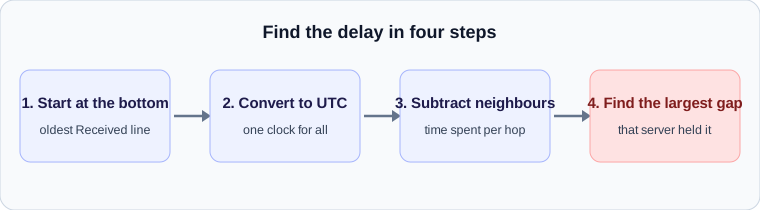
Each server adds its Received line at the top of the message, above the ones already there. That means the newest hop is first and the original sender is last. To follow the journey in the order it happened, start at the bottom and work upward.
A single hop looks like this. The domains and addresses here are reserved examples, not real servers.
Received: from mail-out.example.net (mail-out.example.net [192.0.2.25])
        by mx.example.org with ESMTPS id 4f8a
        for <you@example.org>; Mon, 26 Oct 2026 09:14:52 -0500
Received: from app01.example.net (app01.example.net [192.0.2.10])
        by mail-out.example.net with ESMTP id 91c3
        for <you@example.org>; Mon, 26 Oct 2026 08:41:07 -0500
Step 3: Convert every timestamp to the same time zone
Each stamp ends with an offset such as -0500 or +0000. Servers in different regions write different offsets for the same instant, so comparing the clock times directly will mislead you. Convert everything to UTC first, then subtract.
In the example above both hops happen to use -0500, so the arithmetic is direct: 08:41:07 to 09:14:52 is 33 minutes and 45 seconds. That is a long time for one handoff. A healthy hop between well-run servers usually takes a few seconds.
Step 4: Find the biggest gap and name the server behind it
The delay belongs to the server that received the message, not the one that sent it. In the example, mail-out.example.net accepted the message at 08:41 and mx.example.org stamped it at 09:14. The 33 minutes happened between them, and the usual explanation is that the message waited in mail-out.example.net’s outbound queue before it was handed over.
This is the point where people blame the wrong party. If the gap sits between your own provider and the next server, your provider held it. If it sits inside the recipient’s organisation, such as between an edge gateway and the mailbox server, the recipient’s side held it. Naming the server tells you who to ask.
Step 5: Check the traps that produce false results
Four things regularly make a header look worse, or better, than it was.
- Clock skew. If one server’s clock is wrong by a few minutes, you can get a negative gap, where a later hop appears to happen before an earlier one. Treat a small negative number as a skewed clock, not as time travel, and do not blame that hop.
- Time zones written as names. Some stamps use a zone abbreviation instead of a numeric offset. Abbreviations can be ambiguous, so prefer the numeric offset wherever you have a choice.
- Missing hops. Some systems, particularly internal relays and security gateways, do not add a Received line at all. A gap that appears between two visible hops may include an invisible one.
- Forged lines. The sender controls the earliest Received lines. A line far down the header that does not fit the rest may be an attempt to disguise the origin. The lines added by your own provider, at the top, are the ones you can rely on.
Step 6: Match the gap to a cause
The size of the gap hints at the cause. A few seconds to a minute is normal processing. A gap of around five to thirty minutes between two hops often points to a deferral and retry, the sender’s server being told to try again later and doing so on its schedule. A gap of an hour or more usually means a queue backlog, a policy hold, or a retry cycle that failed more than once. Our guides on common delay causes and on SMTP reply codes cover each of these in detail.
If you would rather not do the arithmetic by hand, paste the header into the analyzer. It performs exactly the steps above in your browser, converts the time zones, flags negative gaps as probable clock skew, and highlights the largest gap. Nothing is uploaded.
What to do with the answer
Once you know which server held the message, the next move is practical. If it was your own provider’s outbound server, check whether you sent a large batch at the same moment or hit a rate limit. If it was a gateway on the recipient’s side, send the relevant lines to their IT team, since they can see logs you cannot. If the gap was inside a free mailbox provider, there is rarely anything to fix, and the useful step is to confirm the message authenticates correctly so it is not treated with suspicion next time.
A worked example
Here is an illustrative set of three Received lines, already reduced to the parts that matter. They are read from the bottom up, because the bottom line was written first.
The lowest line says the message was accepted by mail.sender.example at 08:41:07 UTC. The middle line says relay.gateway.example accepted it at 08:41:09. The top line says the recipient’s mailbox server accepted it at 09:14:52.
Subtract each time from the next one up. The first hop took two seconds. The second took thirty-three minutes and forty-three seconds. The delay therefore sits between relay.gateway.example and the receiving side, so that is the system to ask about. The first two servers did their jobs quickly and can be ruled out.
Mistakes that produce a wrong answer
Most wrong conclusions come from the same few slips, and each is easy to avoid once you know it exists.
- Reading top to bottom. The newest line is at the top, so the story runs upwards.
- Comparing times in different zones without converting them first. A line written in -0500 and one in +0000 are five hours apart before any delay is considered.
- Trusting the Date header. It is written by the sender’s device and is not part of the server trace.
- Blaming the last server. The delay belongs to the gap, which may sit before the server whose name you are looking at.
- Treating a single odd timestamp as proof. If one server’s clock is off, its neighbours on both sides will look wrong in opposite directions.
Check your own email
Paste a raw header into the free analyzer to see every hop, the time spent at each one and the largest gap. It runs in your browser and nothing is uploaded.
Open the email header analyzer