Date vs Received: Why Email Times Disagree
The time your email client shows, the time on the Date line and the times on the Received lines are written by different machines for different reasons.
Last reviewed October 26, 2026 · 6 min read
It is common to open a message that looks six hours late and discover that the delivery path was fast. The explanation is that “when was this sent?” has several honest answers, and your email client picks one of them.
Understanding which clock wrote which timestamp keeps you from chasing a delay that never existed.
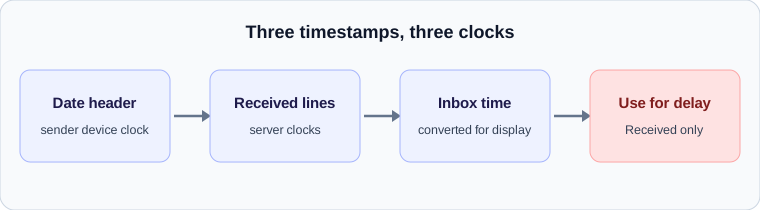
Three kinds of timestamp
The Date header is written by the sender’s email program when the message is composed or sent. It records the time on the sender’s device, in the sender’s time zone. Nothing verifies it. RFC 5322 defines it as the origination date, and it is whatever the sending system said.
The Received headers are written by servers. Each server that handles the message adds one at the top, with the time it accepted the message according to that server’s own clock. These are the trace fields, and they are the basis for any delay calculation.
The time shown in your inbox is a third thing. Most clients display either the Date header or the time the receiving mailbox stored the message, converted to your local time zone. Which one depends on the client and sometimes on a setting.
Why the Date can be wrong
Because the Date header comes from the sender’s own device, it inherits every problem that device has.
- A clock that is set incorrectly, which shifts every message by the same amount.
- A wrong time zone setting, which can shift messages by whole hours.
- Scheduled sending, where the message is composed at one time and released at another. Depending on the program, the Date shows the composition time or the release time.
- Messages composed offline and sent when the connection returned, which carry the time they were written.
- Automated systems that stamp their own template date, so many messages carry an identical time.
Why the Received times are more reliable
A Received timestamp belongs to a server whose job depends on accurate time, and servers are generally synchronised to network time. That does not make them perfect, since a misconfigured server can be minutes out, but it makes them far more trustworthy than a laptop. The Received line closest to the bottom, written by the first server to handle the message, is also the best evidence of when the message really left the sender.
The same applies to forged headers: a sender can write anything in the Date header and can fake the lowest Received lines. The lines added by your own provider, at the top, are the ones you can rely on.
Reconciling the two
The test is straightforward. Take the Date header and the bottom Received line, convert both to the same time zone, and compare. If they are within a minute or two, the sender’s clock is fine and any lateness is real. If they differ by an hour or more, suspect a time zone problem. If they differ by an odd amount, such as seventeen minutes, suspect a clock that is set wrong.
An example: a Date of 14:00 in a zone seven hours behind UTC is 21:00 UTC. If the bottom Received line says 21:01 UTC, everything agrees. If it said 14:01 UTC, the sender’s device had the right clock reading and the wrong zone, and the message was not delayed at all.
What the analyzer does about it
Delay calculation should always use the differences between Received timestamps, never the Date header. Each pair of neighbouring Received lines is compared after converting both to UTC, and the Date header is shown for context only. That is how our analyzer works, and it is why it can tell you a message left the sender within seconds even when the sender’s Date line is hours off.
Practical advice
When you report a late email to anyone, quote the Received timestamps and the server names, not the time you saw in your inbox. It is the information an administrator can check against their logs. And when a message looks hours late but only on one device, check the time zone on the device that sent it before you check anything else.
A worked example
A header shows Date: Mon, 26 Oct 2026 14:00:00 -0700 and, on the bottom Received line, 26 Oct 2026 21:01:12 +0000. Convert the Date to UTC by adding seven hours: it is 21:00:00 UTC. The first server stamped 21:01:12, so the message left the sender about a minute after it was composed. There is no delay at this stage and the sender’s clock is fine.
Now suppose the same Date line but a bottom Received stamp of 14:01:12 +0000. The Date says 21:00 UTC and the server says 14:01 UTC, a gap of seven hours in the wrong direction. The sender’s device had its time zone set incorrectly. Nothing was delayed or sent early; the label was wrong.
Why inbox times sometimes change
Some mail apps sort by the Date header and others by the time the message reached the mailbox. A message with a wrong Date can therefore appear in an odd position in the list, or move after a sync. If a message seems to have jumped, that is usually the explanation, and the Received lines will settle it.
Daylight saving and other surprises
Time zone offsets in headers are fixed numbers, such as -0500 or +0100, and they do not change with the seasons the way a local clock does. A message composed in a place that observes daylight saving will carry a different offset in summer than in winter. This is correct behaviour, but it can look like a one-hour error if you compare messages from different times of year without reading the offsets.
Another common surprise is a message that arrives with a Received time earlier than its Date. That usually means the sender’s clock is ahead of real time. It can also mean the Date was set by a scheduling tool at the moment of composition and the message was released later. In both cases the server timestamps remain the better guide.
Check your own email
Paste a raw header into the free analyzer to see every hop, the time spent at each one and the largest gap. It runs in your browser and nothing is uploaded.
Open the email header analyzer