TLS, STARTTLS and MTA-STS in Email Delivery
Mail servers encrypt their conversations when they can. A failed handshake can slow a message or, under a strict policy, hold it back on purpose.
Last reviewed October 26, 2026 · 7 min read
Email was designed in an era when nobody encrypted anything. Encryption between mail servers was added later as an option, and it is still an option unless a domain says otherwise. That history explains why a modern header can show an encrypted hop followed by a plain one, and why a certificate problem can quietly delay delivery.
This guide covers what the pieces are, how they show up in a header and when they turn into a delay.
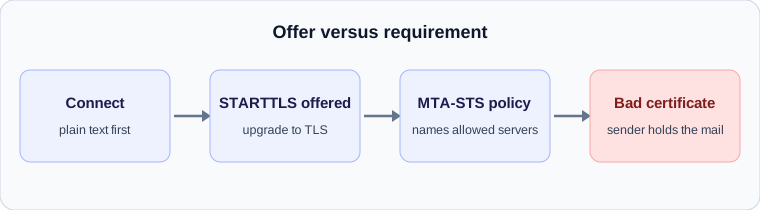
STARTTLS: encryption that starts as an offer
When two mail servers connect, they begin in plain text. The receiving server lists what it supports, and if STARTTLS is among the capabilities, the sender can ask to upgrade the connection to an encrypted one before any message content is sent. In a header this appears as ESMTPS in the Received line, meaning extended SMTP with TLS, compared with ESMTP for a plain connection.
Providers have pushed this hard. Google, for example, lists TLS for transmitting email among the requirements for everyone sending to Gmail accounts, not only bulk senders. So an unencrypted hop into a major provider is increasingly a sign of an old or misconfigured system.
The weakness: nobody checks
Opportunistic STARTTLS has a gap. Because the upgrade is an offer, an attacker positioned between the two servers can strip the line that advertises it, and the sender will carry on in plain text without complaint. An attacker can also redirect the connection by tampering with the MX record. Encryption that can be silently removed is not much of a guarantee.
This is the problem MTA-STS, defined in RFC 8461, was written to solve. It lets a domain declare in advance that it accepts encrypted connections with trusted certificates, and tells sending servers what to do if a connection does not meet the standard.
How MTA-STS works
A receiving domain publishes two things. The first is a DNS TXT record at _mta-sts under the domain, carrying a version and an identifier. The second is a policy file served over HTTPS at a well-known address on an mta-sts host. Senders compare the identifier in DNS with the one they have cached, and only fetch the full policy when it has changed.
The policy lists the allowed mail server names, a cache lifetime and a mode. In enforce mode, senders must not deliver to a server that fails name matching, fails certificate validation or does not support STARTTLS. In testing mode, failures are reported but delivery may continue. In none mode, the domain is treated as having no active policy.
How a TLS problem becomes a delay
Under an enforce policy, a sender that cannot get a valid, encrypted connection must refuse to deliver. The specification is careful about what happens next: the message is not permanently failed until the sender has checked DNS for an updated policy. In practice the message waits in the sender’s queue and the sender retries.
That makes certificate trouble one of the more confusing causes of delay. A mail server whose certificate has expired is an obvious example. To a person it looks like nothing is wrong, because the server is up and answering. To a sender enforcing the policy, it is unreachable, and every message to that domain queues until the certificate is renewed.
Spotting it in a header
The header will not say “TLS failure.” What it shows is a gap at the receiving edge followed by an encrypted hop. If an administrator on the receiving side recently let a certificate lapse, a batch of messages from several different senders may all arrive late at around the same time, a few minutes after the certificate was replaced. That pattern, many senders and one recipient, points at the recipient’s side.
Providers who care about this can ask for reports. The companion standard, TLS reporting, lets a domain receive daily summaries from senders about TLS failures they encountered, which is the quickest way to learn about a problem before users do.
What to do
- Renew mail server certificates well before they expire, and monitor expiry on the hostnames listed in your MX records.
- If you want enforcement, start with testing mode, read the reports, and only move to enforce when failures stop.
- Make sure the names in your MTA-STS policy match the names in your MX records exactly.
- When diagnosing a late message, compare ESMTPS and ESMTP in the Received lines to see where encryption was and was not used.
A worked example
A company publishes an MTA-STS policy in enforce mode listing mail.company.example. One afternoon the certificate on that server expires. Senders that honour the policy refuse to deliver, because the connection no longer meets the requirement. Their queues fill, and messages are retried until the certificate is replaced.
The people receiving mail see nothing at all. The people sending see a delay, or a delay notice after a few hours. The cause is invisible to both groups unless someone looks at certificate expiry or at TLS reports.
Reading encryption in a Received line
The with clause of each Received line says how the message travelled.
- ESMTP means extended SMTP without encryption.
- ESMTPS means extended SMTP over TLS.
- ESMTPSA means the sender authenticated and used TLS, which is typical for the first hop from a mail client to its own provider.
- A mix of ESMTPS and ESMTP across hops is common. It shows which links were protected, not whether the content was readable at the end.
Why this matters for delay and not only security
Because MTA-STS can instruct a sender to hold a message rather than deliver it insecurely, the standard introduces a new kind of deliberate delay. Compared with greylisting, the cause sits on the receiving side’s configuration and can affect every sender at once. That is why a cluster of late messages to one organisation, from several unrelated senders, is a signal worth passing to that organisation’s administrator.
The remedy is routine maintenance: monitor certificate expiry, keep the policy’s list of allowed servers in step with the real MX records, and use the reporting standard so that failures become visible in hours instead of days.
Check your own email
Paste a raw header into the free analyzer to see every hop, the time spent at each one and the largest gap. It runs in your browser and nothing is uploaded.
Open the email header analyzer