Gmail, Yahoo and Outlook Sender Rules Explained
Since 2024 the biggest mailbox providers have turned best practice into requirements. Here is what changed and how to see it in a header.
Last reviewed October 26, 2026 · 8 min read
For years, email authentication was something responsible senders did and everyone else ignored. That ended in stages. Google and Yahoo announced new requirements for bulk senders that took effect in February 2024, and Microsoft followed for its consumer domains in 2025. If you send newsletters, invoices, notifications or anything else at volume, the rules now decide whether your mail arrives at all.
The rules are also a useful lens when you are trying to work out why a message is late or missing. Many delays and rejections that looked mysterious a few years ago now have a short list of likely causes.
What Gmail requires from every sender
Google’s sender guidelines, effective February 1, 2024 for mail going to personal Gmail accounts, set a baseline for everyone, regardless of volume:
- Authenticate the mail with SPF or DKIM.
- Have valid forward and reverse DNS records for the sending server (a PTR record).
- Use TLS to transmit the message.
- Keep the spam rate shown in Google Postmaster Tools under 0.3 percent.
- Format messages according to RFC 5322, and do not impersonate Gmail’s own From addresses.
The extra rules for bulk senders
Google treats a sender as a bulk sender when it sends more than 5,000 messages a day to Gmail accounts. For those senders the bar is higher. They need SPF, DKIM and DMARC all in place, although the DMARC policy is allowed to be p=none. The domain in the visible From address has to align with the SPF or DKIM domain. And marketing and subscription mail must support one-click unsubscribe, which means including both the List-Unsubscribe and List-Unsubscribe-Post headers as well as a visible unsubscribe link in the body.
Google also states that DKIM keys should be at least 1024 bits and recommends 2048. On spam rate, the guidance is to stay under 0.30 percent at all times, and aim for under 0.10 percent as a working target.
Yahoo and Microsoft
Yahoo announced matching requirements alongside Google in the same period, so a sender who satisfies Gmail’s bulk rules is, in broad terms, covered for both.
Microsoft’s version applies to senders of more than 5,000 messages a day to Outlook.com, Hotmail.com and Live.com addresses, with an effective date of May 5, 2025. According to coverage of Microsoft’s announcement, those senders need SPF to pass, DKIM signing, and a DMARC record with at least p=none that aligns with SPF or DKIM. Non-compliant mail was first described as being routed to the Junk folder, with rejection to follow, and the rejection message reads 550 5.7.515 Access denied, sending domain does not meet the required authentication level. Microsoft revised the action on non-compliant mail shortly before the date, so check its current published guidance before relying on any particular behaviour.
What the rules look like inside a header
Compliance leaves visible marks. On a message that meets the rules you should find an Authentication-Results line showing spf=pass, dkim=pass and dmarc=pass, a DKIM-Signature header naming the sender’s domain, and, for marketing mail, the two unsubscribe headers:
List-Unsubscribe: <https://example.net/u/abc123>, <mailto:unsub@example.net>
List-Unsubscribe-Post: List-Unsubscribe=One-Click
How non-compliance appears as delay or rejection
Not every problem produces a bounce. Google documents a 4.7.28 response for senders that are going over limits, and its advice is to slow down and pause sending for at least ten minutes before trying again. A 4 in the first digit marks the failure as temporary, so a sender’s server will try again later. From the recipient’s side that behaviour is simply a late email.
A 5 as the first digit means permanent failure, so there is no retry and the sender receives a bounce. Our guide to SMTP codes explains the difference in more detail. The practical point is that if you find a large gap in a header and the sending domain sends a lot of mail, rate limiting by the receiving provider is a likely suspect, and authentication is the first thing to check.
A short checklist for a small sender
You do not need to be a bulk sender for any of this to matter. Mail from a small business domain that fails authentication is more likely to land in junk, and the cost of fixing it is small.
- Publish an SPF record that lists every service that sends mail for your domain, and keep it under the lookup limit.
- Turn on DKIM signing at your mail provider and use a 2048-bit key if the provider allows it.
- Publish a DMARC record, starting with p=none and a reporting address, and read the reports before tightening the policy.
- Send a test message to a Gmail address and read the Authentication-Results line to confirm all three pass.
How to tell which tier applies to you
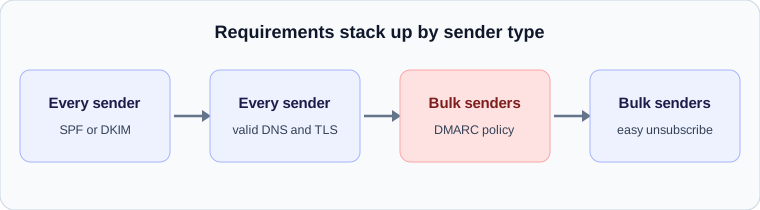
The requirements are layered. Every sender to a Gmail address is expected to meet the baseline: authentication, valid DNS records for the sending server and an encrypted connection. Senders that send mail in high volume are expected to meet more, including a DMARC policy and a simple way for recipients to unsubscribe.
In practice the safest approach is not to guess which tier you fall into. Set up everything in the higher tier. The extra work is small, and it removes the risk of being reclassified when your volume grows.
Checking a real message against the rules
A received header lets you test a sender against the baseline in about a minute.
- Authentication-Results should show spf=pass or dkim=pass, and ideally both.
- The Received line for the hop into your provider should show ESMTPS, which means the connection was encrypted.
- The name in the Received line and the address it resolved to should agree, which is the reverse DNS check covered in our guide on that subject.
- For bulk mail, look for a List-Unsubscribe header. Its absence in a newsletter is a sign the sender has not adopted the newer rules.
Check your own email
Paste a raw header into the free analyzer to see every hop, the time spent at each one and the largest gap. It runs in your browser and nothing is uploaded.
Open the email header analyzer