Greylisting Explained: Why Your Email Arrives Late
A deliberate, temporary rejection that costs legitimate mail a few minutes and costs spammers more than they will pay.
Last reviewed October 26, 2026 · 7 min read
Of all the reasons an email can show up late, greylisting is the only one that is a deliberate act. The receiving server looks at a message from a sender it has never dealt with, says in effect “not right now, try again in a bit,” and waits to see whether the sender comes back.
It sounds obstructive, and for the first message from a new sender it is. But it is cheap to run, it filters a surprising amount of junk, and it leaves a very recognisable fingerprint in a header. If you can recognise it, you can stop worrying about a delay that is working as designed.
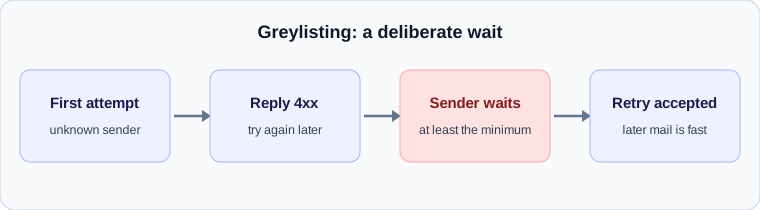
How greylisting works
The idea rests on a difference in behaviour. A legitimate mail server that is told to try later keeps the message in its queue and retries, because the SMTP standard says it should. Much bulk spam software does not bother. It fires a message once, gets a temporary error, and moves on to the next target.
Postgrey, a widely used greylisting service for Postfix, describes the mechanism clearly. For every delivery attempt it builds a triplet from the connecting client IP address, the envelope sender and the recipient. If it has not seen that triplet before, it answers with a temporary error. If the triplet was first seen less than five minutes ago, it also answers with a temporary error. The default delay is therefore five minutes at minimum.
What the sender’s server sees
The temporary error is a 4xx reply, and it usually comes with wording such as “greylisted, please try again later” or just a generic deferral. Because it starts with a 4, the sending server treats it as a reason to wait, not a rejection. Our guide to SMTP reply codes explains why that single digit matters so much.
The sending server then holds the message and tries again on its own schedule. If its first retry comes after the five-minute window, the receiver accepts the message and records the triplet. Many servers retry at intervals of ten, fifteen or thirty minutes, which is why greylisting commonly adds a delay in that range rather than exactly five minutes.
What it looks like in a header
A greylisted message has a signature that is easy to spot once you know it. There is a single large gap in the Received lines, usually between the sender’s outbound server and the recipient’s edge server, and everything after the gap is fast. Before the gap the message moved in seconds. After it, the message moved in seconds. The delay is concentrated at one handoff and is typically somewhere between five and thirty minutes.
If the gap sits somewhere else, for example between two servers inside the recipient’s organisation, greylisting is unlikely. Greylisting happens at the point where mail enters the receiving system, because that is where the sender is an unknown.
Why only some messages are affected
Greylisting is applied per triplet, and a few details of the Postgrey design explain the patchy experience people report. Client addresses have their last byte stripped before matching, so a sender with several servers in the same address range counts as one client. Clients that repeatedly pass the greylist are added automatically to a whitelist and are not delayed again. Entries that are not seen for a long period, with one month given as an example, are removed.
In practice, this means the first email from a new correspondent can be late and every later one is on time, which is exactly the pattern that makes people think the problem was a one-off. It also means a sender who rarely writes to the same recipient can be greylisted again and again, because the record expires between messages.
When greylisting goes wrong
The cost falls on senders whose servers do not retry correctly. Some misconfigured systems treat a temporary error as final. Others retry from a different IP address each time, so the triplet never matches. In both cases, the message can be delayed far beyond five minutes or lost entirely. Postgrey ships with a whitelist of known broken servers for this reason, and the page itself lists delay of at least five minutes and held-back mail from non-retrying senders as the main caveats.
Services that send one-time passcodes are the most visible casualty, because five minutes is too long for a code that expires. If a login code arrives late and the header shows a single gap at the receiving edge, greylisting is a likely cause, and asking the recipient’s administrator to allow the sender is the fix.
What to do about it
The right response depends on which side of the table you sit on.
- As a sender: make sure your mail server retries temporary failures from the same IP address, and avoid rotating through many addresses for a single message.
- As a recipient: if time-sensitive mail from a particular service is being delayed, add that service to your greylisting whitelist.
- As an administrator: check whether the delay is consistent for new senders only. If established correspondents are also delayed, greylisting is not the explanation.
- As a reader of a header: confirm the single gap sits at the receiving edge and that the rest of the path is quick. That pattern is greylisting, and it is working as intended.
A worked example
An illustrative case: a new customer’s server tries to deliver an order confirmation at 10:00:00. Your greylisting service has never seen that combination of client, sender and recipient, so it answers with a temporary error. The customer’s server queues the message and tries again at 10:15:00. Fifteen minutes have passed, which is longer than the minimum, so the retry is accepted.
In the final header you would see a Received line from the customer’s server stamped 10:15, even though the sender believes the message left at 10:00. All the delay sits at one hop, and everything after it is quick. Later messages from the same customer arrive immediately because the combination is now known.
Is it greylisting or something else
A quick comparison separates greylisting from the other causes of a single gap.
- Greylisting affects the first message from a new sender and then stops. A security scan or queue backlog affects messages regardless of history.
- Greylisting gaps cluster around the minimum delay and the sender’s retry interval. Backlogs vary widely.
- Greylisting is applied at the edge of the receiving system. A gap deep inside the recipient’s network points elsewhere.
Check your own email
Paste a raw header into the free analyzer to see every hop, the time spent at each one and the largest gap. It runs in your browser and nothing is uploaded.
Open the email header analyzer