SMTP Error Codes: What 4xx and 5xx Replies Mean
The first digit of an SMTP reply decides whether your email will be retried or bounced. Learn to read it and the rest of the code.
Last reviewed October 26, 2026 · 8 min read
When one mail server hands a message to another, the receiving server answers with a three-digit code. Those codes are the entire vocabulary of the conversation, and they are why some failed emails arrive an hour late while others bounce within seconds. If you can read them, you can tell which kind of problem you have in about the time it takes to look.
The good news is that the system is simple at the top. One digit separates a message that will be tried again from one that will not.
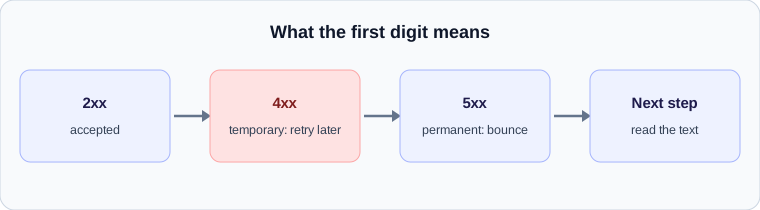
The first digit is the one that matters
Under RFC 5321, a reply beginning with 2 means success. A reply beginning with 4 is a temporary failure, which tells the sender to try again later. A reply beginning with 5 is a permanent failure, which tells the sender to stop and report back.
This is the whole reason delayed email exists as a category. A 4xx reply does not reject the message. It postpones it, and the sending server holds the message in a queue and tries again according to its own schedule. A 5xx reply ends the attempt, and the sender generates a bounce, usually called a non-delivery report.
The second set of numbers: enhanced status codes
Many replies carry a second code in the form x.y.z, defined in RFC 3463, such as 5.1.1 or 4.7.0. The first number repeats the class: 2 for success, 4 for a persistent transient failure and 5 for a permanent failure. The second number says what category of problem it is, and the third gives the detail.
In the second position, 1 refers to addressing problems, 2 to the mailbox, 3 to the mail system, 4 to network and routing, 5 to the mail delivery protocol and 7 to security and policy. This lets you read an unfamiliar code without looking it up. A code beginning 5.7 is a permanent refusal for policy or security reasons, such as authentication failure. A code beginning 4.2 is a temporary problem with the mailbox, such as it being full.
Common codes and what they usually mean
Wording differs between providers, but these patterns are widely seen.
- 421: the receiving service is not available right now or is closing the connection. Temporary. The sender retries.
- 450 and 451: a mailbox or processing problem, typically temporary. Greylisting commonly uses 451 with a message asking the sender to try again later.
- 452: insufficient storage or too many recipients. Temporary.
- 550: the request was refused, often because the address does not exist (5.1.1) or because of policy. Permanent.
- 552 and 554: message too large or transaction failed. Permanent.
What the sender does after a 4xx
A sender’s server does not retry at a fixed rhythm for ever. It queues the message and retries at growing intervals, then gives up after a set period. The SMTP specification expects senders to keep trying for days rather than hours. Postfix, one of the most widely used mail servers, defaults to a five day maximum queue lifetime, and it will tell the sender the message is still queued only if its delay warning feature is enabled, which it is not by default.
This has a direct consequence for how a delay looks in a header. If the first attempt got a 4xx and the second attempt, thirty minutes later, was accepted, the gap in the Received lines is thirty minutes, and the recipient gets a message that is thirty minutes old on arrival, with no bounce and no warning. It is the single most common source of the mysterious late email.
What the delay warning looks like
Some senders do notify you. If a message stays queued long enough, the sending system may deliver a delay notification saying it is still trying and has not yet failed. It usually quotes the last reply code from the remote server, which is the most useful thing in it. If it says 4.7.28 or a message about rate limiting, the receiving side asked the sender to slow down. If it says the connection timed out, the problem was reachability, not policy.
Reading a bounce when it does fail
A permanent failure arrives as a bounce message, and it is worth reading from the bottom. The human-readable text at the top is often generic. The diagnostic code lower down is the actual reply from the remote server, and it is the part to search for. Pay attention to which server generated it. A bounce produced by your own provider before the message left is a different problem from a 550 relayed from the recipient’s server.
Turning the code into a next step
If you are on the sending side and see repeated 4xx replies, slow down and check whether you are over a rate limit, and check that your authentication records are in place. If you are on the receiving side and a sender’s messages are arriving late, look for greylisting or an over-aggressive gateway. If you see a 5.7.x permanent failure, look at SPF, DKIM, DMARC and the sender’s reputation before anything else.
A worked example
Imagine a bounce that reads 550 5.1.1 The email account that you tried to reach does not exist. The first digit, 5, says the failure is permanent. The enhanced code 5.1.1 narrows it: class 5 for permanent failure, subject 1 for addressing, detail 1 for a bad destination mailbox. The sender’s next step is to correct the address, not to retry.
Compare 451 4.7.1 Greylisted, please try again later. The first digit, 4, means temporary. The server is asking the sender to come back, and a well-behaved sending system will do exactly that without anyone noticing, other than a delay.
Turning a code into an action
A simple decision rule covers most cases.
- A 2xx reply: nothing to do. The message was accepted for delivery.
- A 4xx reply: wait. If it keeps happening for hours, look at what the diagnostic text says about the cause, such as rate limiting or a full mailbox.
- A 5xx reply: do not retry unchanged. Read the text, fix the cause, and send again.
- A 5.7.x code: look at authentication and policy before you look at anything else.
Check your own email
Paste a raw header into the free analyzer to see every hop, the time spent at each one and the largest gap. It runs in your browser and nothing is uploaded.
Open the email header analyzer